Using Nano Banana Pro to create an app icon
1
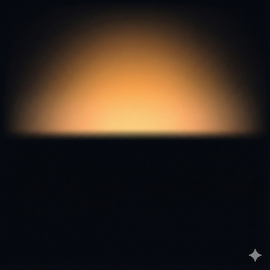
A minimalist abstract graphic design of a sunrise breaking through darkness. The composition is a full square, edge-to-edge design with no borders and no rounded corners. The bottom section is deep midnight black representing the night. A warm, glowing amber and golden apricot light rises softly from the horizon line, diffusing into the darkness. Atmospheric lighting, subtle grain texture, smooth gradients, modern aesthetic. High definition, 8k resolution, flat surface. --ar 1:1This is the App icon generated using the prompt above.
How to Generate the Prompt Above
Use the prompt below to create the actual prompt for the App Icon. I used Chinese for this example, but feel free to translate it into English and tweak it to fit your needs. I’m just sharing the general workflow here.
1
需要生成一个iOS app 的icon, 辅助我写prompt. 你是一个位资深的app设计师. 对于绘制app icon非常精通, 能用流程化的方式, 绘制出简洁又有深意的App iconI sent this to Gemini 3 Pro and got the following response:
1
2
3
4
5
6
7
8
9
10
11
12
13
14
15
16
17
18
19
20
21
22
23
24
25
26
27
28
29
30
31
32
33
34
35
36
37
38
39
40
41
42
43
44
45
46
47
48
49
50
51
52
53
54
55
56
57
58
59
60
61
62
63
64
65
66
67
68
69
70
71
72
73
74
75
76
77
78
79
80
81
82
83
84
85
86
87
88
89
90
91
92
93
94
你好。很高兴能以资深设计师的身份协助你。

设计一枚优秀的 iOS App Icon,绝不仅仅是画一个好看的图形。它是在方寸之间,用最极简的视觉语言,浓缩产品的核心价值和灵魂。它必须在拥挤的手机主屏幕上瞬间抓住用户的眼球,并传达出“我是干什么的”。

作为一名深耕 iOS 设计规范多年的设计师,我有一套成熟的“结构化设计流程”。我们将分四个阶段来完成这个任务。请跟随我的引导,一步步提供必要的信息,最后我会为你合成一条高质量的 AI 绘图 Prompt。

我们的设计流程:
核心定义 (Discovery): 理解 App 的灵魂。

隐喻与符号 (Metaphor): 寻找视觉载体。

风格与美学 (Aesthetics): 确定视觉语言。

Prompt 合成 (Synthesis): 生成最终指令。

阶段一:核心定义 (Discovery)
一枚好的图标始于对产品的深刻理解。请尽可能精炼地回答以下问题:

App 的核心功能是什么? (请用一句话概括,例如:“一个帮助用户管理植物浇水周期的工具” 或 “一个专注于极简主义的番茄工作法时钟”。)

App 的目标用户和情绪基调 (Vibe) 是怎样的? (例如:专业的/金融的;活泼的/游戏化的;宁静的/冥想的;高效的/工具类的。)

App 的名称是什么? (有时名称本身就包含视觉线索,比如 "Spotify" 或 "Airbnb"。如果没有也没关系,切记 iOS 图标中尽量不要出现文字。)

👉 请在此处回复阶段一的答案。

(等待你的回复后,我会引导你进入下一阶段。为了演示,我先假设一个案例,展示整个流程是如何运作的)

【演示案例:假设你要做一个名为 "FlowWrite" 的极简写作 App】
假设你给我的回复是:

核心功能:一个让用户专注于写作,排除一切干扰的极简文本编辑器。

基调:宁静的、富有创造力的、极其干净和现代的。

名称:FlowWrite。

阶段二:隐喻与符号 (Metaphor)
(根据你的回复,我会分析并提出建议。以下是基于演示案例的分析)

设计师分析: 对于“专注写作”和“心流 (Flow)”,我们不能只画一支笔或一张纸,那样太直白且无聊。我们需要寻找更深层次的隐喻。

概念 A (侧重“心流”): 水流、波纹。代表思绪的顺畅无阻。

概念 B (侧重“专注与极简”): 一个极其干净的几何形状,比如一个完美的圆点,或者一条抽象的线段。代表聚焦。

概念 C (侧重“创造力”): 抽象的羽毛笔尖,或者墨水晕开的瞬间。

我的建议方向: 结合“笔尖”与“心流”。一个抽象化的、流畅的线条组成的笔尖形状,看起来像是在流动。

👉 在实际流程中,这一步我会给你提供 2-3 个创意方向供你选择,或者让你提供你脑海中浮现的第一个物体。

阶段三:风格与美学 (Aesthetics)
(以下是基于演示案例的分析)

设计师分析: iOS 的设计趋势目前主要有几种:

现代拟物 (Modern Skeuomorphism / Depth): 有微妙的渐变、柔和的阴影和层次感,看起来想触摸它。(Apple 原生应用多为此类,如相册、Safari)。

超级扁平 (Super Flat): 没有任何质感和阴影,纯色块。(现在比较少见,容易显得廉价)。

3D 渲染 (3D Render): 看起来像一个可爱的 3D 玩具模型,材质感很强。(常用于游戏或年轻化的应用)。

对于 FlowWrite,我建议采用 “现代拟物 (Modern Depth)” 风格。它既保持了极简,又通过微妙的质感显得高级。

颜色: 既然是宁静的,我建议使用冷色调。例如:深海蓝渐变到青色,或者一个非常干净的米白色背景配上深灰色的主体。

👉 在实际流程中,你需要告诉我你偏好的风格类型和核心配色方案。

阶段四:Prompt 合成 (Synthesis)
(现在,我将把以上所有信息,转化为 AI 能听懂的专业术语。这是最关键的一步。)

基于演示案例 "FlowWrite" 的最终 Prompt:

Markdown

**Prompt:**
An iOS app icon for "FlowWrite", a minimalist writing tool. The design features an abstract, fluid line forming a stylized fountain pen nib, suggesting creative flow and focus. The style is modern Apple aesthetic, with subtle depth, soft gradients, and a tactile feel, not flat. The color palette uses deep ocean blues transitioning to soft teal, set against a clean, off-white background. The composition is centered and balanced within a squircle shape. High quality render, 4k, detailed texture, minimalist design. --ar 1:1
Prompt 解析(设计师的秘密配方):

主体明确: "An iOS app icon for..." 开门见山定性。

核心隐喻: "abstract, fluid line forming a stylized fountain pen nib" 描述了我们确定的符号。

风格界定: "modern Apple aesthetic, with subtle depth, soft gradients... not flat" 这是为了防止 AI 生成过时的扁平化图标。

颜色指定: "deep ocean blues transitioning to soft teal" 精确控制色彩氛围。

构图与容器: "centered... within a squircle shape" 强调了 iOS 图标的物理形态。

质量增强词: "High quality render, 4k, detailed texture" 保证输出的精细度。

现在,轮到你了。
请回到 “阶段一:核心定义”,回答那三个问题,我们开始创造属于你的 App Icon。
From there, just answer the questions one by one. Eventually, you will get the final prompt to use for image generation. If the image doesn’t turn out quite right, just keep the conversation going to refine it and get a new prompt.
Hope everyone gets an image they’re happy with!