ios serious 01
01. What’s the UIViewController lifecycle?
- init
- loadView
- viewDidLoad
- loadViewIfNeeded
- viewWillAppear
- viewWillLayoutSubviews
- viewDidLayoutSubviews
- viewDidAppear
- viewWillDisappear
- viewDidDisappear
- deinit
I hadn’t noticed loadViewIfNeeded before. Usually I just access vc.view to force the view to load. loadViewIfNeeded is definitely clearer and more explicit—it avoids accidental side-effects when you only want to load the view conditionally.
viewWillLayoutSubviews
Use viewWillLayoutSubviews() when you want to update constraints. Examples:
- Activate/deactivate constraints depending on size class / orientation
- Update constraint constants
viewDidLayoutSubviews
Use viewDidLayoutSubviews() when you need the final frames (they are already computed at this point). Examples:
- Setting
cornerRadius = view.bounds.height / 2 - Updating
CAShapeLayer.path - Adjusting
contentInsetbased on final sizes - Doing “scroll-to-visible” once frames are valid
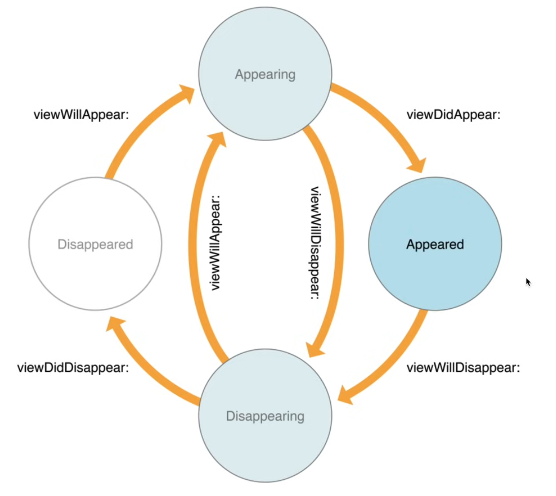
Note: viewDidDisappear() might not be called if a dismissal is cancelled. For example, if you interactively pull down a modal sheet but then release it to cancel the dismissal, the view never actually disappears. These appear/disappear methods can be called multiple times during such interactions.
Rotate the screen
Sequence:
- viewWillTransition(to:with:)
- viewWillLayoutSubviews (source VC)
- viewDidLayoutSubviews (source VC)
- viewWillLayoutSubviews (target VC)
- viewDidLayoutSubviews (target VC)
What’s the difference between a struct and a class?
Struct
- Value type (allocated on stack)
- Thread safe (usually)
- Cannot inherit (but can adopt protocols)
- Default choice
- The Swift standard library uses structs for frequent types: numbers, strings, arrays, and dictionaries.
- Compiler optimization: Copy-on-Write
Class
- Reference type (allocated on heap)
- Not thread safe
- Can inherit; can adopt protocols
How to choose?
- Struct by default: Easier for compiler optimization and thread safety.
- Class if you need interoperability with Objective-C APIs.
- Class if you need to share mutable state.
- Class if you need identity (
===).
What’s protocol oriented programming?

Common protocols: Hashable, Decodable, Encodable, Identifiable.
- Define behavior as protocols
- Provide shared implementations via protocol extensions
- Compose types from multiple protocols
Why?
- Better reuse than deep inheritance
- More modular and testable
Concurrency in Swift
Grand Central Dispatch (GCD)
Queue types:
- Serial Queue
- Concurrent Queue
(Another term is “Task” or “Block” for the actual logic code)
DispatchGroup: Manually call enter() and leave() if executing an async task inside the closure.
1
2
3
4
5
6
7
8
9
10
11
12
13
14
15
16
17
let group = DispatchGroup()
let queue = DispatchQueue.global()

queue.async(group: group) {
    // task A
}

queue.async(group: group) {
    // task B
}

group.notify(queue: .main) {
    print("done")
}

let result = group.wait(timeout: .now() + 3)
print(result == .success ? "ok" : "timeout")
Delay API:
1
2
3
DispatchQueue.main.asyncAfter(deadline: .now() + 1) {
    print("1s later")
}
Note: wait() will block the current thread.
Cancel an async task:
1
2
3
4
5
6
7
8
9
10
var workItem: DispatchWorkItem?

func schedule() {
    workItem?.cancel()  // Cancel the previous one
    let item = DispatchWorkItem {
        print("run")
    }
    workItem = item
    DispatchQueue.main.asyncAfter(deadline: .now() + 0.5, execute: item)
}
Create a queue:
1
let concurrentQueue = DispatchQueue(label: "com.yourapp.concurrent", attributes: .concurrent)NSOperation
Built on top of GCD, but object-oriented.
- Operation: An abstract class. Use
BlockOperationor subclass it. - OperationQueue: Executes operations.
Why use it over GCD?
- Dependencies:
op2.addDependency(op1)(Run op2 after op1). - Cancelable: You can cancel operations (need to check
isCancelledinside the operation). - Control:
maxConcurrentOperationCount = 1makes it a serial queue.
1
2
3
4
5
6
let queue = OperationQueue()
let op1 = BlockOperation { print("Task 1") }
let op2 = BlockOperation { print("Task 2") }

op2.addDependency(op1)
queue.addOperations([op1, op2], waitUntilFinished: false)
Swift Concurrency
Introduced in Swift 5.5. Replaces closure callback hell.
- async/await: Linear code flow for async operations.
- Task: The bridge between sync and async worlds.
Task { await ... } - async let: Run tasks in parallel (Structured Concurrency).
1
2
3
4
// Parallel execution
async let image1 = fetchImage(1)
async let image2 = fetchImage(2)
let (img1, img2) = await (image1, image2)- TaskGroup: Dynamic parallelism (e.g., fetch a list of IDs).
1
2
3
4
5
await withTaskGroup(of: Data.self) { group in
    for id in ids {
        group.addTask { await fetch(id) }
    }
}
of: Data.self acts as a strict contract:
- Constraint: All child tasks added via
group.addTaskmust returnData. - Type Safety: If you try to add a task returning
Int, the compiler stops you. - Usage: When you collect results (
for await result in group), Swift knowsresultisData.
Actors & Isolation
Actor
- Reference type (like class) but thread-safe.
- Protects mutable state. Only one task accesses the mutable state at a time.
- Internal properties are isolated. External access requires
await.
1
2
3
4
5
actor Counter {
    var value = 0
    func increment() { value += 1 }
}
// Outside: await counter.increment()
MainActor
- A global actor for UI.
@MainActorensures code runs on the main thread.
Model-View-Controller

1
2
weak open var dataSource: UITableViewDataSource?
weak open var delegate: UITableViewDelegate?
Lazy
1
2
3
lazy var v: View = {...}()

let x = numbers.lazy.map { $0 * 2 } // x is not [Int]
lazy means creation happens only when needed.