My Ideal CI/CD Workflow for Solo macOS Development
TL;DR
You can view the full GitHub Workflows file here.
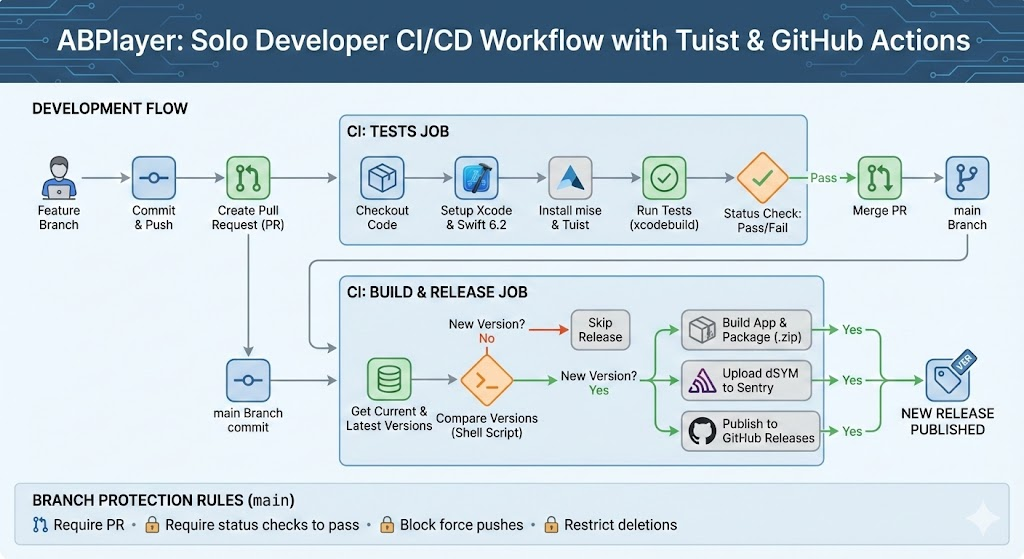
Recently, I’ve been developing ABPlayer, a macOS app that allows users to import audio, supports transcription generation, and enables simultaneous listening and watching. I have configured GitHub Actions into what I consider the optimal setup for a one-person development team.
I use Tuist to generate the macOS project. I chose Tuist because native Xcode project files (.xcodeproj) often suffer from poor readability and prone to conflicts, even in solo projects (and especially in collaboration). With this setup, the CI system only needs to read and process Tuist’s Project.swift file.
The workflow is built on two core principles:
Feature Development: Develop features on new branches. Every time a PR is submitted, tests run automatically. Once passed, the code is ready to be automatically merged.
Automated Releases: After merging to the
mainbranch, if the app version is higher than the latest version in GitHub Releases, the system automatically builds and publishes it to GitHub Releases.
Job: Tests
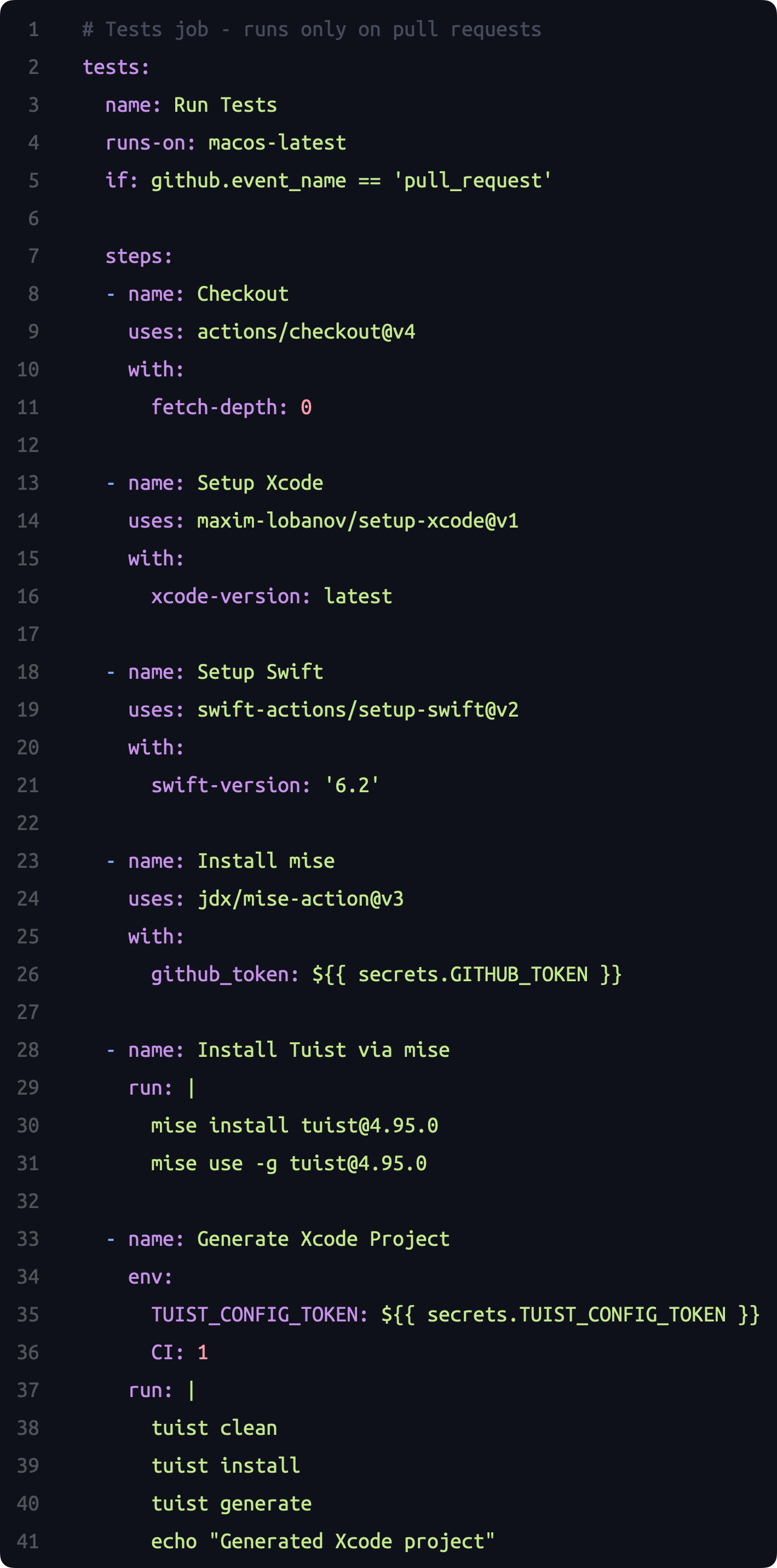
Whenever a new PR is created, the CI automatically builds the project and runs tests. The main steps are:
Checkout code
Setup Xcode
Setup Swift (Version 6.2)
Install mise (for installing Tuist)
Install Tuist
Run tests
I use xcodebuild to execute the tests:
1
2
3
4
5
6
7
8
- name: Run Tests
  run: |
    xcodebuild test \
      -workspace ABPlayer.xcworkspace \
      -scheme ABPlayer \
      -destination 'platform=macOS' \
      -enableCodeCoverage YES \
      -derivedDataPath DerivedData
Job: Build-and-Release
While this job shares similarities with the test job, there are several key differences:
Comparing the build version against the latest GitHub Release.
Building the Artifact and packaging the
App.zip.Publishing the latest version to GitHub Releases.
Uploading dSYM files to Sentry.
Note on Permissions: By default, the GITHUB_TOKEN only has read-only access. Publishing an app to Releases requires write permissions. You must explicitly verify contents: write in your YAML file to authorize the CI to publish the release.
1
2
permissions:
  contents: write
Version Comparison
The version comparison is primarily implemented via a Shell script.
First, it uses the GitHub API to fetch the latest version tag from Releases. Then, it uses a script to read the version configured in the Project.swift file. The comparison result is stored in $GITHUB_OUTPUT, allowing subsequent steps to read the steps.compare_versions.outputs.should_release variable directly.
1
2
3
4
5
6
7
8
9
10
11
12
13
14
15
16
17
18
19
20
21
22
23
24
25
26
27
28
29
30
31
32
33
34
35
36
37
38
39
- name: Get Current Version
  id: get_version
  run: |
    VERSION=$(grep '"CFBundleShortVersionString":' Project.swift | sed -E 's/.*"CFBundleShortVersionString": "([^"]+)".*/\1/')
    echo "version=$VERSION" >> $GITHUB_OUTPUT
    echo "Current Version: $VERSION"

- name: Get Latest Release Version
  id: get_latest_release
  env:
    GH_TOKEN: ${{ secrets.GITHUB_TOKEN }}
  run: |
    LATEST_TAG=$(gh release view --json tagName --jq .tagName 2>/dev/null || echo "0.0.0")
    echo "latest_tag=$LATEST_TAG" >> $GITHUB_OUTPUT
    echo "Latest Release Tag: $LATEST_TAG"

- name: Compare Versions
  id: compare_versions
  run: |
    CURRENT="${{ steps.get_version.outputs.version }}"
    LATEST="${{ steps.get_latest_release.outputs.latest_tag }}"

    # Remove 'v' prefix if exists for comparison
    CURRENT_CLEAN=$(echo $CURRENT | sed 's/^v//')
    LATEST_CLEAN=$(echo $LATEST | sed 's/^v//')

    if [ "$CURRENT_CLEAN" = "$LATEST_CLEAN" ]; then
      echo "Versions are the same. Skipping release."
      echo "should_release=false" >> $GITHUB_OUTPUT
    else
      HIGHER=$(printf "$CURRENT_CLEAN\n$LATEST_CLEAN" | sort -V | tail -n1)
      if [ "$HIGHER" = "$CURRENT_CLEAN" ] && [ "$CURRENT_CLEAN" != "$LATEST_CLEAN" ]; then
        echo "Current version $CURRENT is higher than latest $LATEST. Proceeding with release."
        echo "should_release=true" >> $GITHUB_OUTPUT
      else
        echo "Current version $CURRENT is NOT higher than latest $LATEST. Skipping release."
        echo "should_release=false" >> $GITHUB_OUTPUT
      fi
    fi
Other Essential Configurations
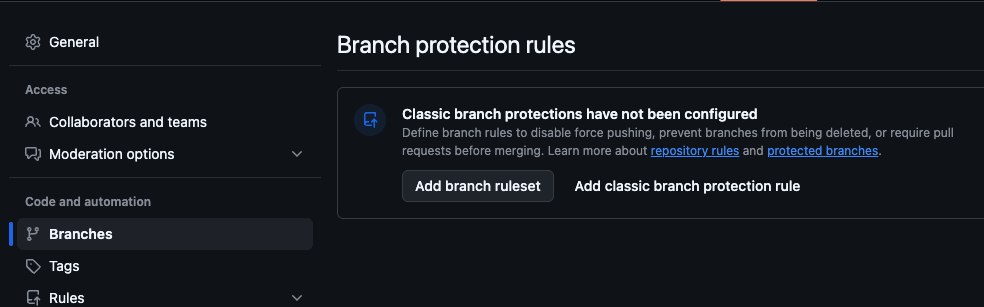
Humans are prone to laziness, but machines are not. Therefore, I enforce a rule that code must pass tests before it can be merged into main. This is absolutely necessary.
By configuring Branch Protection Rules, you can enforce this requirement. For the main branch, you need to check Require status checks to pass. In addition to this, I have configured the following:
Restrict deletions
Require a pull request before merging
Require status checks to pass
Block force pushes
Future Ideas
I plan to automate the changelog generation by reading the current version’s changes—including bug fixes and new requirements—from a CHANGELOG file and writing these updates directly into the GitHub Releases.
If your team is hiring for iOS / Swift / SwiftUI roles (Calgary or remote), I’d love to connect.