008.Refactoring the Neo4J Cache Layer
Last week was almost entirely firefighting. We use Neo4J as our graph query backend, and to speed things up we had been caching a large volume of relationship data in Redis. The problem: the cache kept growing, and so did the AWS bill.
When I first proposed migrating the cache to DocumentDB (MongoDB-compatible), I estimated it would take a week. In the end, just the initialization alone took two weeks, and the full migration took about three weeks. We hit a lot of unexpected issues along the way. This post documents the approach, the problems, and the outcome.
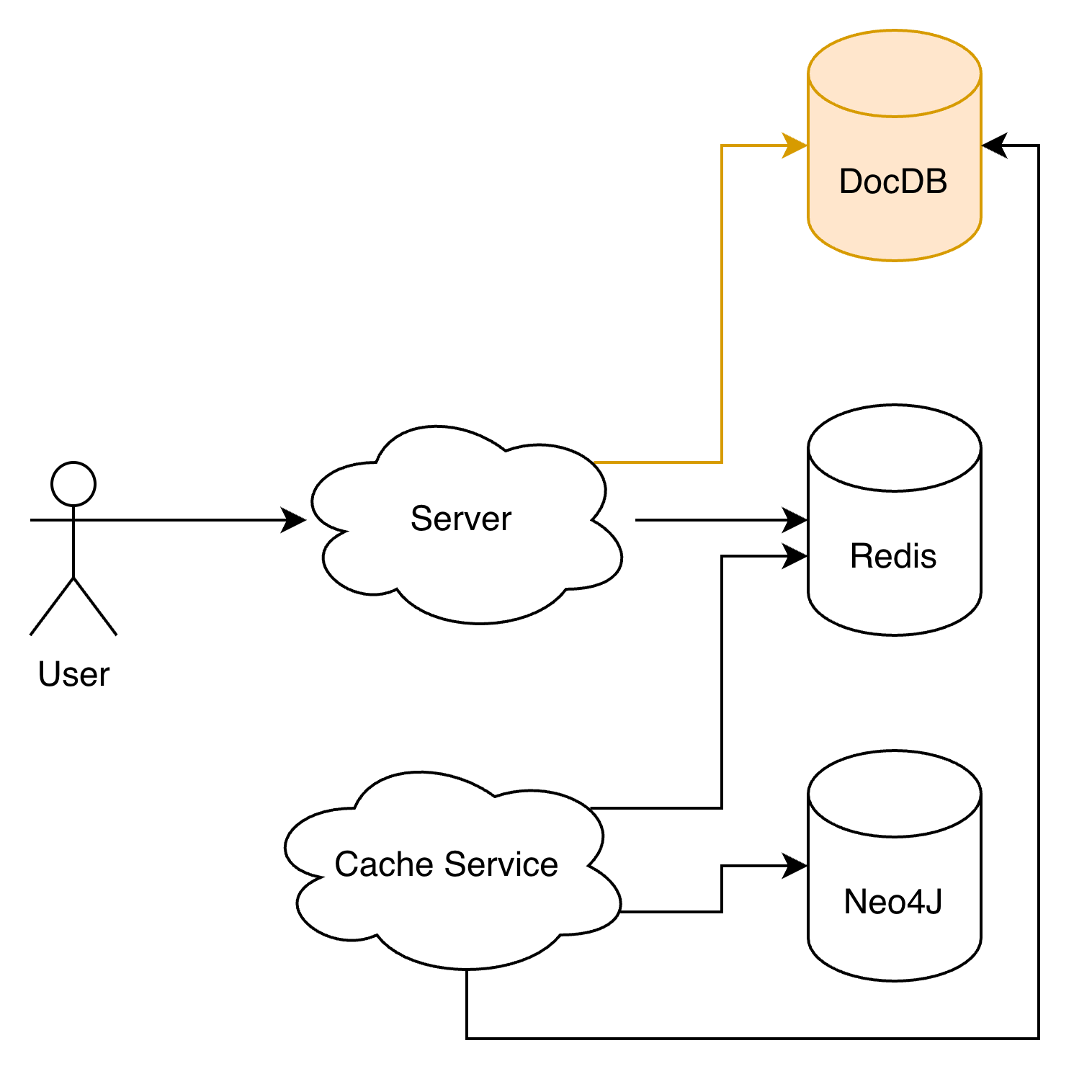
Background and Goals
We have a Cache Service that syncs relationship and node data from Neo4J into Redis for fast reads of user relationship data. Performance was never the issue — cost was:
- A large portion of the cached data was rarely accessed, resulting in low cache utilization.
- Memory-optimized instances were holding cold data long-term, which is terrible value for money.
The goal of this refactor was to introduce a hot/cold data separation:
- Hot data stays in Redis.
- Infrequently accessed cache moves to AWS DocumentDB.
State of the Code (Before)
Reading the code before starting, I had a bad feeling.
- Many files across apps/ shared the same names.
- The code itself was nearly identical across them.
- ElasticSearch logic was mixed in with cache initialization code.
- Incremental cache update logic was scattered across multiple apps.
- Lots of lint errors, lots of commented-out code blocks.
All classic red flags — any change risked a cascade of side effects, making estimation impossible. Before touching the migration, I did two things first:
- Fixed all related lint issues and deleted dead code.
- Read the entire call chain end-to-end, then cross-checked it against Codex’s analysis.
Migration Strategy
The approach was low-risk: dual-write first, then shift reads, then shrink Redis.
- Dual-write phase: writes go to both Redis and DocumentDB simultaneously.
- Validation phase: monitor consistency and production behavior.
- Convergence phase: remove unnecessary cold-data writes from Redis.
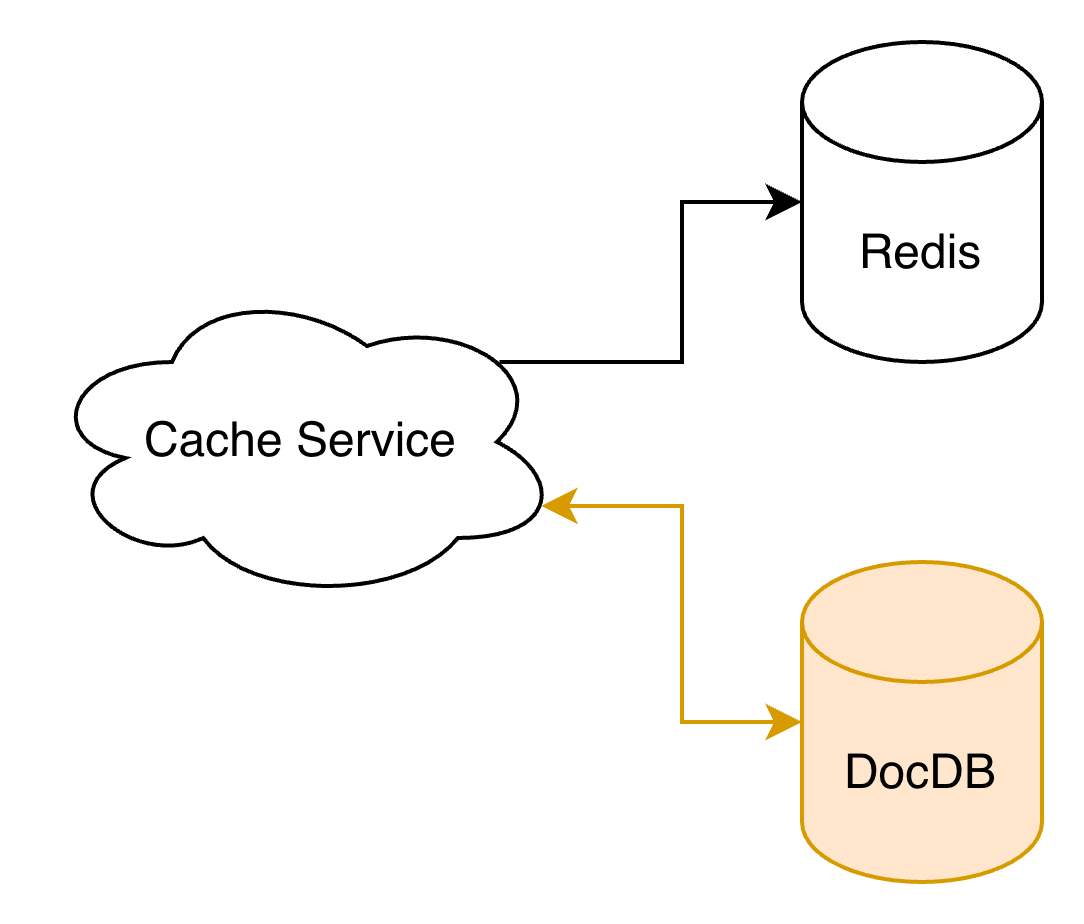
Challenge 1: Query and Write Pressure
Indexing
This is a common problem when writing large volumes of data — usually adding an index is enough. However, DocumentDB has poor support for indexing arrays of embedded documents: $in queries on such fields do not use indexes. For example:
1
2
3
4
5
6
7
{
  ...
  identities: {
    platform: x,
    id: 1234,
  }
}
The following query will not hit an index:
1
2
3
4
5
6
7
8
9
10
db.relation.find({
    identities: {
        $in: [
            {
                platform: "x",
                id: 1234,
            },
        ],
    },
});
To work around this, we manually concatenated the identity fields and stored them as a flat string x_1234. This allows the query to hit the index:
1
2
3
4
5
db.relation.find({
    identities: {
        $in: ["x_1234"],
    },
});
Database I/O
The original code was fetching 10,000 records at a time. I had already reduced this to 1,000, but DocumentDB Insights was still flagging many queries with I/O warnings. The batch size had to be reduced further to 100 records per query or update.
Challenge 2: Controlling Runtime Memory
The original concurrency was set to 100 with a taskGroup size of 1,000, which meant the EC2 instance had to load 100 × 1,000 records into memory simultaneously — enough to OOM the instance. I went down several dead ends trying to fix this: deduplicating documents in memory, splitting requests into batches of 100. In the end, setting concurrency to 1 and groupSize to 100 solved it completely, making all those earlier optimizations unnecessary — so I deleted that code.
Challenge 3: Full Cache Initialization Was Too Slow
We had long avoided doing a full cache rebuild for exactly this reason: it’s slow. This refactor made it unavoidable, and we needed it to finish fast. Investigating the root cause revealed the main bottleneck: every time a record was written to Redis, it triggered a synchronous HTTP request to update ElasticSearch data and indexes.
The fix was to decouple ES from the write path entirely. All ES operations were pushed onto an asynq queue, and a dedicated ES-Init Worker was started to process those updates asynchronously.
AWS OpenSearch Default Request Body Limit: 1 MB
To improve throughput, we batched tasks and submitted data for 1,000 nodes in a single request. This quickly produced a wave of errors. Checking the logs revealed the request body was exceeding the size limit. We extracted the ES code into a shared package at pkg/es and updated the document assembly logic to ensure each request stays under 1 MB.
Concurrent ES Update Conflicts
After fixing the request size, things worked locally but still errored in production. The errors turned out to be document version conflicts — the same document was being updated concurrently more than once. Without proper deduplication in place, the only option was to run single-threaded for now. If we want to improve throughput later, we’ll need to deduplicate before dispatching requests — currently the dispatch layer is already working with raw bytes, which makes this tricky. Left as a known issue for future optimization. The priority for now was getting the new cache live.
Results
The refactor delivered three concrete wins:
- Redis instance downgraded from
cache.r7g.4xlargetocache.r7g.2xlarge, cutting roughly 60 GB of memory usage and reducing instance cost by about half — saving approximately $1,000/month. - Cache utilization improved: DocumentDB now handles infrequently accessed data, Redis is focused on hot data, and the overall cost-efficiency is much better.
- Full cache initialization time cut from ~8 hours to ~4 hours.
Closing Thoughts
Hold your code to a standard. Don’t copy-paste. Delete dead code instead of commenting it out. Keep things decoupled.
Most importantly: read the code fully before estimating the work. Otherwise, be prepared to work late every night for a week.